Starlink is open in your other tab. Here’s how to see the referral took.
On Starlink’s order page, look for this green box under Checkout before you pay:
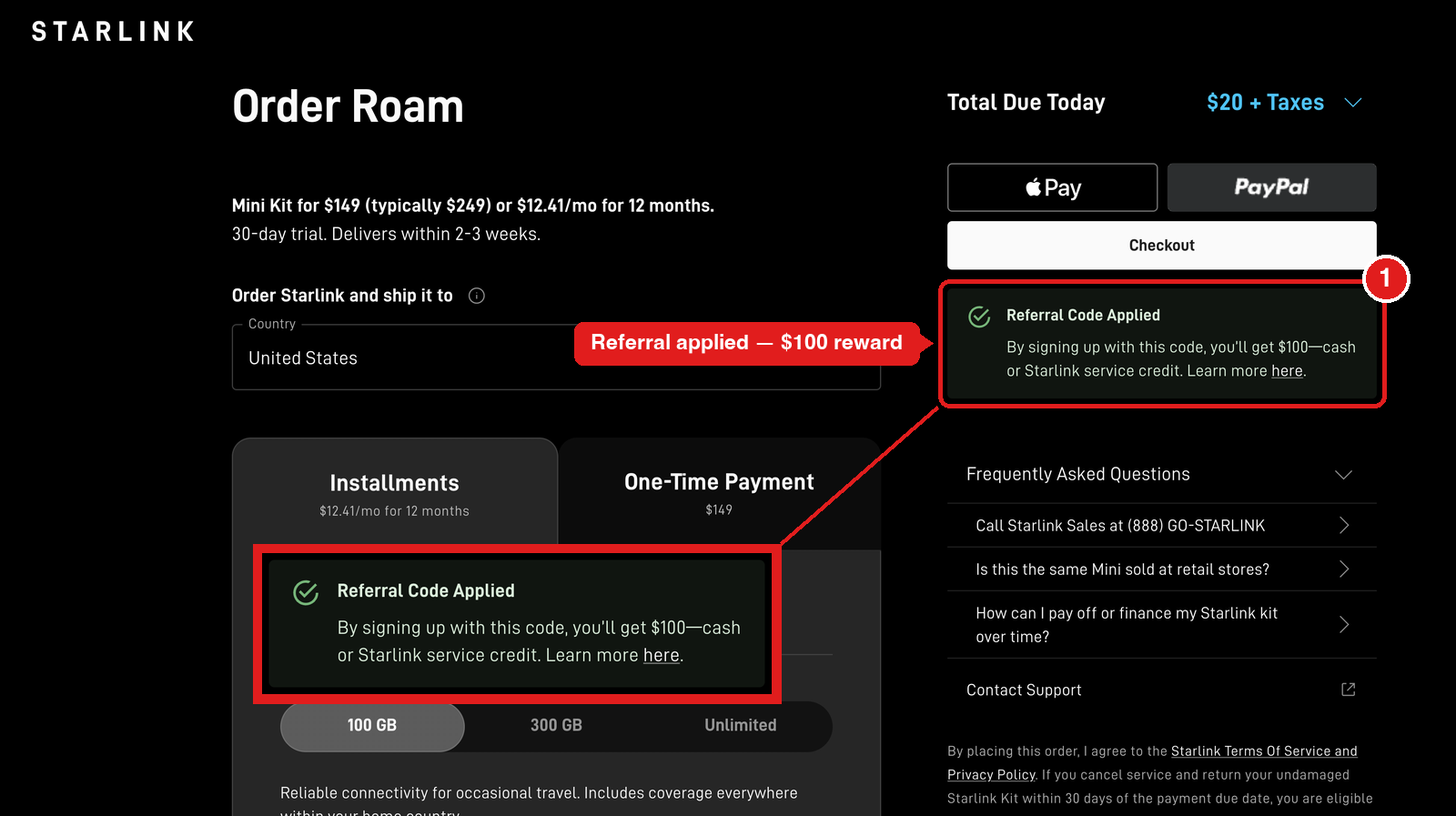
Real screenshot of Starlink’s Roam order page, taken through a referral link. The red box, the “1” marker, its label and the enlarged callout were added by us; everything else is Starlink’s page as it appeared. Starlink can change the page’s layout and wording at any time.
Open the screenshot full size (easier to read on a phone)
Disclosure: this is the site owner’s own Starlink referral link. If you order through it, Starlink may give the owner a referral reward too. Your price is the same. US service addresses only. How we make money
This is the box you’re looking for
Starlink’s Roam page doesn’t say a word about the referral. It only shows up on the order page, in a green box under the Checkout button. Pick your Mini and plan in the other tab, get to that page, and look for it before you pay.
We ordered our way to Starlink’s checkout through the referral link on Oct 9, 2026, with Roam 100 GB ($55/month) and the Mini kit ($149, or $12.41/month for 12 months) in the cart, and stopped before paying. Marker 1 is the confirmation.
What the green box said on Oct 9, 2026
Referral Code Applied · “By signing up with this code, you’ll get $100—cash or Starlink service credit. Learn more here.”
- Where
- Roam order page
- Spot
- Under “Checkout”
- Colour
- Green box
- Reads
- “Referral Code Applied”
From the Roam page to the green box, in four moves
Start in the tab that just opened
The button you clicked opened starlink.com on its Roam page. Stay in that tab. If you close it and type starlink.com yourself, the referral is gone and you’ll need the link again.
Pick the Mini and a Roam plan
Choose the Mini kit and a Roam plan: 100 GB, 300 GB or Unlimited all work with the Mini and all count for the referral. The Mini kit is $149 or $12.41/month for 12 months on Starlink’s US order data; the Mini price page here keeps the dated figure.
Set the country to United States
Unlike a Residential order, Roam doesn’t ask for a service address up front. The order page only asks which country you’re in. Pick United States and carry on to the order page.
Look under the Checkout button
Before you enter card details, find the Checkout button. Directly under it there should be a green box headed Referral Code Applied, saying the code gets you $100 as cash or service credit. If it’s there, the referral is attached to this order. If it isn’t, don’t pay yet: see the fixes below.
No green box? Work down this list
Most misses come from the link and the checkout ending up in different places. Check these before you pay, because Starlink doesn’t add a referral to an order after the fact.
| What happened | Why the box is missing | Fix |
|---|---|---|
| You closed the tab and typed starlink.com, or came back from a search result | Typing the address or using a search link starts a visit without the referral. | Use the button under the screenshot again and order from the tab it opens. |
| You opened the link on one device and are ordering on another, or in the Starlink app | The referral stays in the browser that opened the link. A different phone, laptop, browser or the app doesn’t know about it. | Open the link again on the device and browser you’ll pay in. |
| Private or incognito window, or strict cookie and tracking blocking | Some privacy settings drop what starlink.com remembers between pages, the referral included. | Use a normal window, or allow site data for starlink.com, then open the link again. |
| You have, or had, a Starlink account | The reward is for new customers only. Adding a Mini to an existing account doesn’t count. | Nothing to fix: the reward doesn’t apply, whatever the page shows. |
| You’re buying the kit at a store | Retail and reseller purchases are outside the program. | Order the Mini and Roam plan on starlink.com through the link. |
The reward rules, short version
- Who
- New Starlink customers with a US service address
- What
- $100 (Starlink’s help center gives $100 as the US example); Starlink’s terms say the amount is the one shown in your account
- Where
- Kit and plan ordered on starlink.com through the link, in the same browser
- When
- After two billing cycles subscribed; Standby Mode months don’t count
- How paid
- Account credit by default, or cash where your account offers it
- Code to type
- None: the referral rides in the link
Starlink sets the reward and can change it; the figure in your Starlink account is the one that applies. Returning the kit inside the 30 days return window ends it before two cycles. For the full rules as they apply to a Mini, read our post does the $100 referral reward work with the Mini?, and for how this site earns from the owner’s link, how we make money. Our terms of use cover the rest. Starlink’s own rules: Starlink Referral Program Terms.
Quick questions from Mini buyers
Does the $100 come off the Mini price at checkout?
No. You pay the normal kit and Roam price. The green box only confirms the referral is attached to the order. The $100 reward comes later, after two billing cycles subscribed, as account credit by default or cash where your account offers it.
Is there a referral code I need to type in?
No. The referral travels inside the link, so there’s no code box to fill in. That’s why the box only appears when you reach the order page in the same browser that opened the link.
I already bought my Mini at a store. Can I still get the reward?
No. Starlink’s program needs the kit and the plan ordered on starlink.com through the referral link. Kits from a retail store, a reseller or a previous owner don’t qualify, even if you activate them on a new account.
I clicked the link on my laptop but want to order on my phone. Will it carry over?
Not reliably. The referral lives in the browser that opened the link. Open the link again on the phone, in the browser you’ll check out in, and look for the green box there before you pay.
Can I pause the Mini in Standby Mode right after I order?
Not if you want the reward. Months in Standby Mode don’t count toward the two billing cycles. Keep a paid Roam plan until the reward shows in your Starlink account.
Sources
- Does Starlink have a referral program? (Starlink Help Center) · checked Nov 16, 2026
- Starlink Referral Program Terms, DOC-1882-84808-83 (republished Oct 7, 2026) · published Oct 7, 2026 · checked Nov 16, 2026
- Tesla North: Starlink referral link (updated Oct 8, 2026) · published Oct 8, 2026 · checked Nov 16, 2026
- Starlink public marketing availability API (US, invitationTypeCode=8 / Roam) · checked Nov 16, 2026
- How do I return my Starlink kit? · checked Nov 16, 2026
Once the Mini is ordered, the power side is what this site is for: size a battery or solar setup for the hours you’ll run it.