Key takeaways
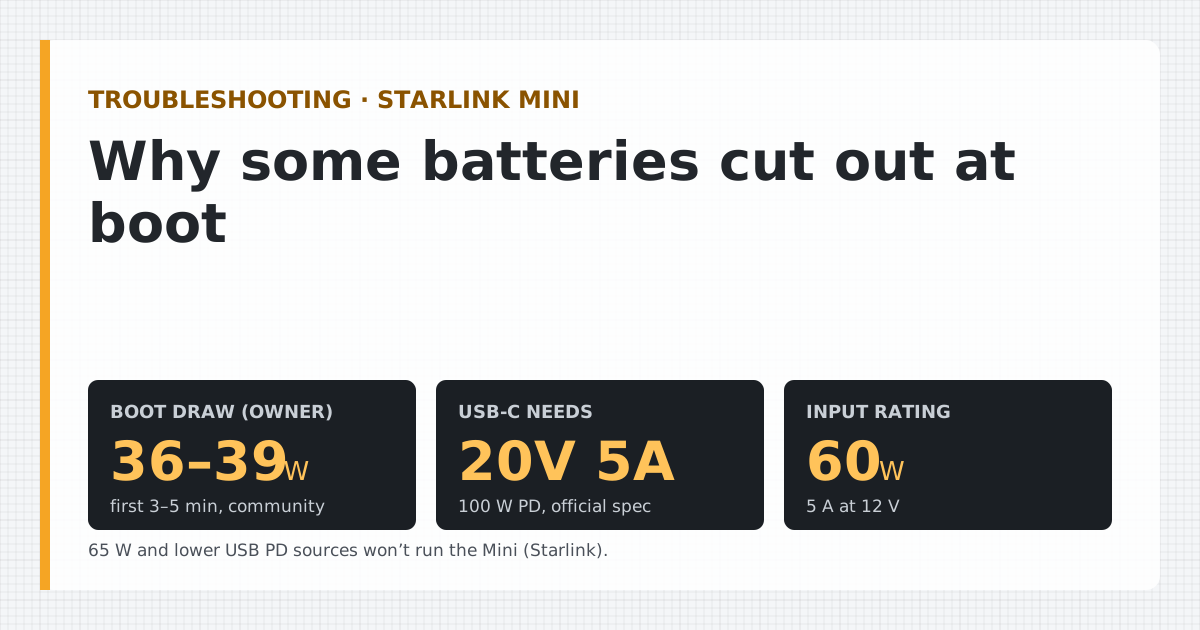
- One owner's USB-C meter showed 36–39 W Community report: A dated measurement posted by an owner, cited. Checked Oct 5, 2026 for the first 3–5 minutes after a cold boot, above Starlink's 40 W average ceiling. Starlink rates the Mini's input at 60 W Official spec: From a Starlink specification sheet or help article. Checked Oct 5, 2026.
- On USB-C, the Mini needs a source rated at least 100 W Official spec: From a Starlink specification sheet or help article. Checked Oct 5, 2026 (20 V / 5 A). Starlink says 65 W or lower won't work, and owners report 60 W ports failing to start it.
- On 12 V, the input rating means up to about 5 A. A thin, long cable can lose a volt or more at that current, and the Mini may restart in a loop.
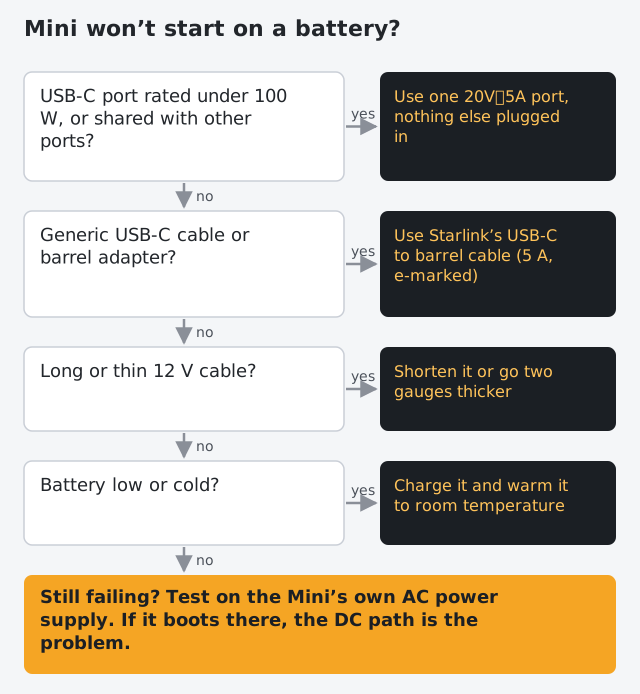
- Fixes, in order: a true 100 W single port, Starlink's own USB-C cable, a shorter or thicker 12 V cable, a higher supply voltage (it accepts 12 V to 48 V).
A Starlink Mini works hardest in its first few minutes: one owner’s USB-C meter read 36–39 W Community report: A dated measurement posted by an owner, cited. Checked Oct 5, 2026 for 3–5 minutes after a cold boot, above Starlink’s 40 W Official spec: From a Starlink specification sheet or help article. Checked Oct 5, 2026 average ceiling, and Starlink rates the input at 60 W Official spec: From a Starlink specification sheet or help article. Checked Oct 5, 2026. A battery that’s marginal on any of three things fails right there: the USB-C port can’t hold 20 V / 5 A, the cable isn’t up to it, or a 12 V run sags below the Mini’s minimum voltage. The fix is almost never a bigger battery.
What happens in the first five minutes
When the Mini powers up it boots its software, orients itself, searches for satellites and builds a connection. Starlink doesn’t publish a boot figure. The best dated measurement we have:
- 36–39 W Community report: A dated measurement posted by an owner, cited. Checked Oct 5, 2026 for the first 3–5 minutes after a cold boot, USB-C inline meter (Escape Trailer forum, Feb 2025).
- After boot, the same owner saw the draw swing between 11–38 W Community report: A dated measurement posted by an owner, cited. Checked Oct 5, 2026 as use changed.
An iRV2 forum member also says the Mini can briefly hit 60 W at startup, which would match Starlink’s input rating, but we couldn’t confirm how it was measured, so it’s marked unverified on our watts table.
In energy terms, boot is cheap: five minutes at the high reading is only about 3.3 Wh at the Mini. It’s not the energy that defeats batteries at boot. It’s the rate, and how the supply responds to it.
Cause 1: the USB-C port can’t hold 20 V / 5 A
Starlink’s requirement is specific: 100 W at 20 V and 5 A, using its USB-C to barrel jack cable. It also says Starlink says the Mini will not work with USB PD sources rated 65 W or lower.
A USB-C charger and a device agree on a voltage and current before power flows (that’s USB Power Delivery, “PD”). A 65 W port tops out at 20 V × 3.3 A. The Mini asks for more than that, so the port either refuses or shuts down when the load rises during boot.
Owner reports line up with this:
- A reader's Goal Zero Yeti 1000X would not start the Mini from its 60 W USB-C port or its 12 V Anderson output; only the AC adapter worked. Community report: A dated measurement posted by an owner, cited. Checked Oct 5, 2026
- A TacomaWorld member's two 100 W PD power banks would not power the Mini at all (no red light). Community report: A dated measurement posted by an owner, cited. Checked Oct 5, 2026
- Another member says his 65 W PD output works only with a short cable, and suggests a '100 W' bank may not really deliver 100 W. Community report: A dated measurement posted by an owner, cited. Checked Oct 5, 2026
The second report is the instructive one: banks labeled “100 W” that still failed. The usual reasons are that 100 W is the total across several ports, that the bank only reaches 100 W on one specific port, or that it drops its output when its own charge is low. Our explainer on what “PD 100W” actually promises shows how to read the label.
Cause 2: the cable
Two separate cable problems show up at boot.
On USB-C: carrying 5 A needs a cable built and electronically marked for it. The USB Type-C specification says USB Type-C spec: every cable rated above 3 A is an electronically marked (e-marked) cable, so 100 W (20 V x 5 A) needs a 5 A e-marked cable. Starlink requires its own USB-C to barrel jack cable for USB-C power and says Starlink's USB-C cable is only for powering the Mini; it is not for charging phones and not compatible with the Gen 3 Router. A generic USB-C cable with a barrel adapter may negotiate only 3 A, which is 60 W at 20 V, and fail at boot.
On 12 V: current is what heats and drops voltage in a wire, and at 12 V the Mini’s current is high. At its 60 W input rating that’s 5 A; at the boot reading, about 3.3 A. Every foot of copper has resistance, so the Mini sees less than the battery’s voltage.
Cause 3: voltage drop on a 12 V run
The Mini accepts 12 V Official spec: From a Starlink specification sheet or help article. Checked Oct 5, 2026 to 48 V Official spec: From a Starlink specification sheet or help article. Checked Oct 5, 2026. A “12 V” battery sits around 12–13 V when charged and less as it empties. Lose a volt in the cable and the Mini can see less than its minimum just when it needs the most, then restart, then try again.
Worked example for a 20-foot run (40 feet of wire there and back) at the Mini’s 60 W rating, from 12 V, using standard copper resistance per 1,000 ft Standard: From a regulator, standards body or reference table:
| Wire gauge | Drop at 60 W | Drop at 40 W |
|---|---|---|
| 18 AWG (6.39 ohm/1000 ft) | 1.3 V | 0.9 V (7.1%) |
| 16 AWG (4.02 ohm/1000 ft) | 0.8 V | 0.5 V (4.5%) |
The same cable that’s fine once the Mini settles can be marginal during boot, especially on a battery that’s half empty or cold. Starlink’s own advice: Starlink's Mini setup guide says that if a 12 V supply or battery causes issues, use a shorter or thicker-gauge cable, supply a higher voltage, or use the USB-C cable with a 100 W supply or the Car Adapter. Official spec: From a Starlink specification sheet or help article. Checked Oct 5, 2026 The 12 V guide has the full gauge table and fusing notes.
One reviewer’s experience points the same way: DISHYtech's author says in his testing the Mini's DC input needs a supply of at least 120 W (12 V/10 A) to boot consistently. Community report: A dated measurement posted by an owner, cited. Checked Oct 5, 2026 That’s twice the Mini’s rating; it reflects headroom for boot and sag, not an official requirement.
Cause 4: the battery itself
- Nearly empty. Many banks and stations reduce output, or refuse high-power profiles, near empty. A bank that starts the Mini at 100% may not at 15%.
- Cold. Lithium cells deliver less current when cold; voltage sags further under load.
- Port protection. Some power stations and banks trip when the load jumps. Others have an auto-off that cuts a port when the load is light, which can catch the Mini later, at idle. Neither is a Mini fault.
- A specific model that just won’t. A reader's MARBERO 296 Wh solar generator kept failing to run the Mini on both its DC and AC outputs. Community report: A dated measurement posted by an owner, cited. Checked Oct 5, 2026 Not every battery works, and the reason isn’t always visible on the label.
Fixes, in the order to try them
- Use one 100 W USB-C PD port, with nothing else plugged into the bank. The label should show 20 V⎓5 A on that port.
- Use Starlink’s USB-C to barrel cable, not a generic cable plus adapter.
- Charge the battery and warm it to room temperature, then try again.
- On 12 V: shorten the cable or go thicker. Two gauge steps thicker cuts the drop by more than half at the same length.
- On 12 V: raise the voltage. The Mini accepts up to 48 V. A 24 V system, or a boost converter to around 24 V, cuts the current and the drop. Fuse and wire any converter properly.
- As a test, use the Mini’s own power supply from an AC outlet (wall or station). If it boots there and not on your DC path, the DC path is the problem.
What to do next
If your Mini still won’t start, our troubleshooting page walks through the other power failures (overheating, inverter losses, winter solar shortfall). For choosing a battery that will work, start with how long a battery runs the Mini and the USB-C power bank guide.
Questions people ask
How much power does a Starlink Mini draw at startup?
One owner measured 36–39 W for the first 3–5 minutes after a cold boot with a USB-C meter. Starlink doesn't publish a boot figure; its input rating, the most the Mini is rated to take, is 60 W.
Why won’t my power bank start my Starlink Mini?
Usually the bank's USB-C port can't hold the 20 V / 5 A profile Starlink requires: ports rated 65 W or lower can't, and some "100 W" banks split power across ports. Other causes: a cable that isn't Starlink's USB-C to barrel cable, or a bank that's nearly empty.
Why does my Starlink Mini keep rebooting on 12V?
Most often voltage drop: at boot the current rises, a long or thin cable loses more voltage, and the Mini dips below its 12 V minimum. Starlink suggests a shorter or thicker cable, a higher supply voltage, or the USB-C cable with a 100 W source.
What size power supply do I need to boot a Starlink Mini on DC?
Starlink's rating is 12 V to 48 V at 60 W. DISHYtech's author reports needing at least a 120 W (12 V / 10 A) supply for consistent boots in his testing; that's one reviewer's experience, not a Starlink requirement.
Does the Mini draw more power when it boots in the cold?
The 36–39 W reading was after a cold boot. Starlink doesn't publish a cold-start figure, and if snow melt is on the Mini may also heat. Give it the full rated supply in winter.
Sources
- Starlink Mini Specifications (PDF) · retrieved
- What USB power rating do I need to power my Starlink Mini? (Starlink Help Center) · retrieved
- Starlink Mini Kit - Setup Guide (Starlink Help Center) · retrieved
- StarLink Mini measured power consumption (Escape Trailer Owners forum) · retrieved
- Starlink Emergency Kit - Powering the Mini with a USB-C power bank (DISHYtech) incl. reader comments · retrieved
- Show us your Starlink Mini setup! page 3 (TacomaWorld) · retrieved
- American wire gauge (Wikipedia) · retrieved
Starlink figures render from our watts table and fact file with the date we checked them. Runtime and solar math uses the planning assumptions on how we get our numbers until bench results replace them.
Independent · not affiliated with SpaceX or Starlink. We don’t sell Starlink. Links to Starlink’s plan pages here use the site owner’s own referral link (Starlink may give the owner a referral reward; your price is the same); nothing else in this article earns us anything. We haven’t used a Starlink Mini ourselves: Mini figures come from Starlink’s published specs or dated owner reports, labeled that way. General information, not electrical advice. How we make money · Report an error