Key takeaways
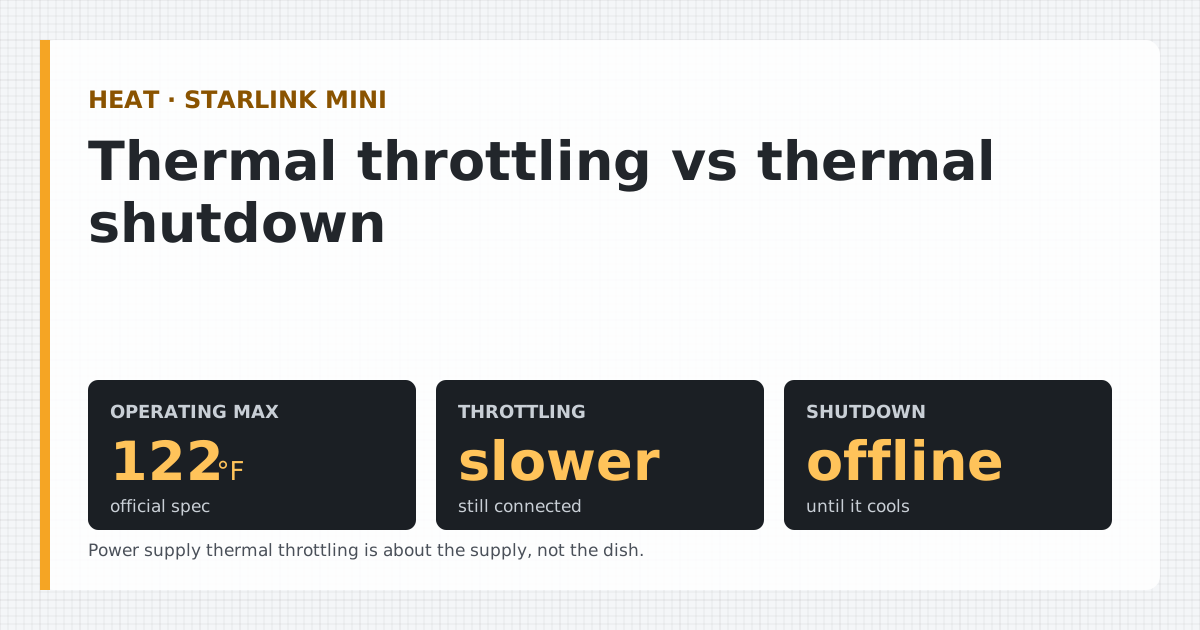
- Thermal throttling: the dish is near its limit and runs at reduced performance. Thermal shutdown / Starlink overheated: it hit the limit and stopped service until it cools; it reconnects by itself.
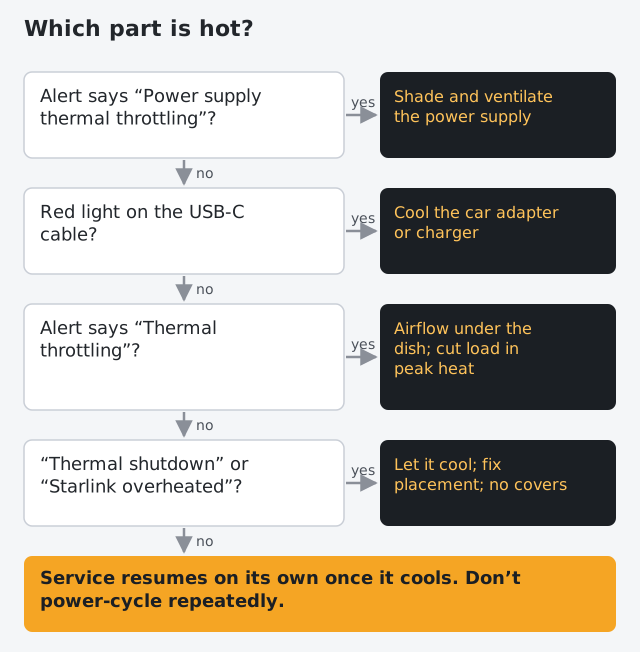
- Power supply thermal throttling is a different problem: the power supply is too hot, so Starlink cuts its power draw. Move or shade the supply, not the dish.
- Starlink rates the Mini to operate from -22 °F Official spec: From a Starlink specification sheet or help article. Checked Oct 5, 2026 to 122 °F Official spec: From a Starlink specification sheet or help article. Checked Oct 5, 2026. A dish in direct sun can run hotter than the air temperature around it.
- On USB-C, a red light on Starlink's cable means the car adapter or charger is too hot; it recovers when it cools.
- Fixes, in order: airflow under and around the dish, no covers or cases while running, shade the power gear (not the dish's view of the sky), cut load in peak heat, and wait it out.
Thermal throttling means your Starlink Mini is close to its temperature limit and is running slower to avoid overheating. Thermal shutdown (and the related “Starlink overheated” alert) means it reached the limit and stopped service until it cools, then reconnects on its own. A fourth alert, power supply thermal throttling, is about the power supply, not the dish. The fix for all of them is heat management: airflow, no covers, shade on the power gear, and less load in the hottest hours.
The four heat alerts, in Starlink’s words
| Alert | Starlink’s definition | What you notice |
|---|---|---|
| Thermal throttling | The 'Thermal Throttling' alert means the dish is running at reduced performance to avoid overheating. Official spec: From a Starlink specification sheet or help article. Checked Oct 5, 2026 | Slower speeds; still connected |
| Thermal shutdown | Starlink's 'Thermal Shutdown' alert means the dish hit its maximum temperature and stopped service to cool down; service resumes once it cools. Official spec: From a Starlink specification sheet or help article. Checked Oct 5, 2026 | Connection drops until it cools |
| Starlink overheated | The 'Starlink Overheated' alert means the dish shut down from high temperature and will reconnect after cooling. Official spec: From a Starlink specification sheet or help article. Checked Oct 5, 2026 | Drops; reconnects after cooling |
| Power supply thermal throttling | The 'Power Supply Thermal Throttling' alert means the power supply is too hot and Starlink throttles its power draw to cool down. Official spec: From a Starlink specification sheet or help article. Checked Oct 5, 2026 | Reduced performance; the dish may be fine |
The first three describe the dish. The fourth describes the power supply, and it changes where you look.
The temperature limits we know
- The Mini: -22 °F Official spec: From a Starlink specification sheet or help article. Checked Oct 5, 2026 to 122 °F Official spec: From a Starlink specification sheet or help article. Checked Oct 5, 2026 operating, per its spec sheet.
- Router and power supply indoors: Starlink says the router and power supply are also rated to operate indoors between 0 and +30°C (+32 to +86°F). (That’s from Starlink’s general weather article, not Mini-specific; the Mini spec sheet gives its power supply an outdoor rating of The Mini power supply is rated IP66 Type 4.)
- The trigger points: Starlink doesn’t publish the internal temperature at which throttling or shutdown starts.
One thing to understand: the operating range is about air temperature, but a dish in direct summer sun absorbs heat and can run hotter than the air around it. A day well inside the range can still produce a shutdown if the Mini sits on hot asphalt, a dark car roof or inside a closed case.
Why the Mini gets hot
Heat comes from two places: the sun and the Mini’s own electronics. The Mini turns all the power it draws into heat in the end; at 25–40 W Official spec: From a Starlink specification sheet or help article. Checked Oct 5, 2026 on average, and more under heavy load (one owner logged 39 W Community report: A dated measurement posted by an owner, cited. Checked Oct 5, 2026 in heavy evening use), it needs somewhere to shed it.
Common causes in owner reports and Starlink’s guidance:
- Direct sun on a hot day, especially midday and afternoon.
- A hot surface underneath: asphalt, a dark vehicle roof, a metal deck.
- No airflow: flat on the ground, pressed against a wall, or tucked into a corner.
- A case or cover while running. Starlink advises against covers; a closed travel case is worse. Our cases guide explains.
- Heavy use in the heat: streaming and video calls raise the internal load at the hottest time of day. See does streaming drain it faster.
- A power supply or charger baking in a car, in sun or in an enclosed box.
Fixes, in order
- Get air under and around it. Use the kickstand or a mount that lifts it off hot surfaces. Our mounts guide covers options.
- Remove any cover or case. Starlink strongly recommends against adding protective covers, which degrade performance and snow melting.
- Move it off heat sources: hot roofs, asphalt, reflective walls.
- Shade the power gear, not the dish’s view. The power supply, any USB-C charger and your battery can sit in shade freely. Anything that shades the dish from the sky also blocks its signal.
- Reduce load in peak heat. Schedule big downloads and calls for morning or evening.
- Let it recover. Starlink says service resumes once it cools. Don’t power-cycle repeatedly; it adds boot heat.
On USB-C power: the red light
If you power the Mini through Starlink’s USB-C cable from a car adapter or charger, there’s a separate heat signal: A red light on the Mini USB-C cable means the car adapter/charger is too hot; it recovers automatically once it cools. Official spec: From a Starlink specification sheet or help article. Checked Oct 5, 2026 That’s the charger, not the Mini. Get it out of direct sun and give it airflow. Starlink also says: The USB-C end and the Mini Car Adapter itself should not be exposed to outdoor environments.
Batteries have their own heat limits too. A power bank or station sitting in a hot car loses capacity faster and may shut its output off to protect itself, which looks like a Mini problem but isn’t. Keep batteries in shade and follow the maker’s temperature range.
In a hot car
A parked car on a summer day gets far hotter inside than outside. Starlink doesn’t publish a storage temperature range for the Mini in the documents we checked, but its power supply and router indoor rating (Starlink says the router and power supply are also rated to operate indoors between 0 and +30°C (+32 to +86°F).) is a clear hint that a hot cabin isn’t a good place for running power gear. If the Mini runs from a car, mount it outside in the air, keep the adapter shaded and ventilated, and don’t leave batteries baking on the dashboard.
What we don’t know
- The internal temperature thresholds for throttling and shutdown.
- How much the Mini’s draw rises with heat: we haven’t found a controlled measurement.
- Whether repeated thermal events affect lifespan: not published.
What to do next
For the full overheating guide, including cold-weather limits, see Mini overheating: causes and fixes. If heat strikes while you’re on a battery, the troubleshooting page covers the other power failures that can look the same.
Questions people ask
What does thermal shutdown mean on Starlink?
Starlink defines it as the device reaching its maximum temperature threshold and stopping service to cool down. Service resumes on its own once it cools.
What is the difference between thermal throttling and thermal shutdown?
Throttling means the dish is approaching its limit and runs at reduced performance to avoid overheating; you stay connected but slower. Shutdown means it reached the limit and stopped service until it cools.
Why does my Starlink Mini overheat?
Usually a combination of hot air, direct sun, poor airflow (on a hot surface, in a case, against a wall) and heavy use. A power supply or charger baking in a hot car or in sun can trigger its own throttling.
What temperature does the Starlink Mini shut down at?
Starlink publishes the operating range, -22 °F to 122 °F, but not the internal temperature at which shutdown triggers. The dish's own temperature in sun can be higher than the air.
Can I put a cover or shade over my Starlink Mini?
Starlink strongly recommends against protective covers on the dish. Shade structures that block the sky also block the signal. Shade the power supply, cables and battery instead, and give the dish airflow.
Does overheating damage the Starlink Mini?
The alerts exist to protect it: it slows down or stops before it gets too hot, then recovers. We haven't seen Starlink publish anything about long-term effects of repeated thermal events.
Sources
- What are the alerts on my Starlink App? (Starlink Help Center) · retrieved
- Starlink Mini Specifications (PDF) · retrieved
- I live in an area with snow, heavy rain, wind, lightning, or extreme temperatures - can I still use Starlink? (Starlink Help Center) · retrieved
- Starlink Mini - USB-C Cable (Starlink Help Center) · retrieved
- How much power does my Starlink need? (Starlink Help Center) · retrieved
Starlink figures render from our watts table and fact file with the date we checked them. Runtime and solar math uses the planning assumptions on how we get our numbers until bench results replace them.
Independent · not affiliated with SpaceX or Starlink. We don’t sell Starlink. Links to Starlink’s plan pages here use the site owner’s own referral link (Starlink may give the owner a referral reward; your price is the same); nothing else in this article earns us anything. We haven’t used a Starlink Mini ourselves: Mini figures come from Starlink’s published specs or dated owner reports, labeled that way. General information, not electrical advice. How we make money · Report an error