Key takeaways
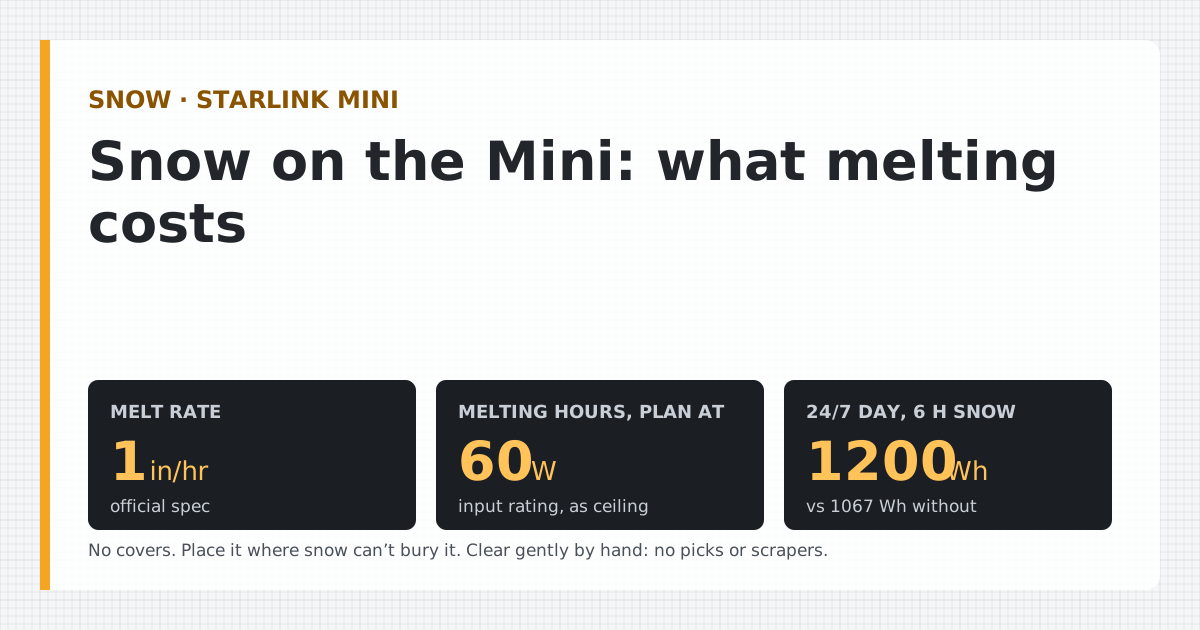
- Starlink Mini can melt snow at up to 25 mm (1 in) per hour. Official spec: From a Starlink specification sheet or help article. Checked Oct 5, 2026 The Mini has three Snow Melt modes: Off, Automatic (recommended) and Pre-heat, which may use more power.
- Starlink publishes no melt wattage for the Mini, and we found no dated owner measurement of it. We plan melting hours at its 60 W input rating, about 66.7 W from the battery.
- Six snowy hours in a 24/7 day add about 133 Wh against the top of Starlink's average range, or about 267 Wh against one owner's measured average.
- Don't cover it: Starlink says covers degrade performance, including snow melting. Place it where snow won't bury it, and clear it gently by hand if you need to.
- A sleep schedule saves power but stops snow melt while asleep. A buried Mini may need clearing before it reconnects.
The Starlink Mini melts snow by itself: Starlink’s spec sheet rates it at up to 1 in/hr Official spec: From a Starlink specification sheet or help article. Checked Oct 5, 2026, controlled by the Snow Melt setting in the app. What Starlink doesn’t publish is how much power melting takes. On wall power that hardly matters. On a battery it does, so we plan snowy hours at the Mini’s 60 W Official spec: From a Starlink specification sheet or help article. Checked Oct 5, 2026 input rating. Six snowy hours raise a 24/7 day from about 1,067 Wh to 1,200 Wh from the battery at the top of Starlink’s range. The other rules are simple: no covers, a spot where snow can’t bury it, and clear it gently by hand.
What Starlink says about snow
Starlink covers snow in three places: the spec sheet and two help articles. The power-relevant points:
- Melt rate. Starlink Mini can melt snow at up to 25 mm (1 in) per hour. Official spec: From a Starlink specification sheet or help article. Checked Oct 5, 2026 For comparison, Standard melts snow at up to 40 mm (1.5 in) per hour. That’s 1.5× the Mini’s rated rate, on a bigger dish that also draws more power.
- How it works. Starlink’s snow article says Snow Melt “automatically uses the power it draws to gently heat the dish.” In other words, melting is paid for in watts.
- Modes. Snow Melt has Off, Automatic (recommended) and Pre-heat modes; Pre-heat may increase power consumption and Off uses no extra power. Official spec: From a Starlink specification sheet or help article. Checked Oct 5, 2026
- Heavy snow. Starlink says heavy snow completely covering the dish may cause intermittent connectivity or a temporary loss of service. It recommends a spot where the dish is unlikely to be buried or see significant buildup.
- Ice. Starlink says light ice buildup or icicles generally don’t affect performance, and you can remove snow or ice gently at any time, but not with picks, chisels or scrapers.
- Covers. Starlink strongly recommends against adding protective covers, which degrade performance and snow melting. Official spec: From a Starlink specification sheet or help article. Checked Oct 5, 2026
- Cold. Starlink Mini's operating temperature range is -30°C to 50°C (-22°F to 122°F). Official spec: From a Starlink specification sheet or help article. Checked Oct 5, 2026
How much power does melting take?
Here’s what we have, and what we don’t:
| What | Figure | What it tells you |
|---|---|---|
| Mini input rating | 60 W Official spec: From a Starlink specification sheet or help article. Checked Oct 5, 2026 | The most the Mini is rated to take. Our ceiling for melting hours. |
| Mini average (Starlink) | 25–40 W Official spec: From a Starlink specification sheet or help article. Checked Oct 5, 2026 | Normal use, not melting. Starlink measures it at AC input, incl. the supply. |
| Mini melting, measured | None found | Starlink doesn’t publish it; we found no dated owner meter reading. |
| Older Standard Actuated, melting | 45 W Community report: A dated measurement posted by an owner, cited. Checked Oct 5, 2026 | One owner’s app readout on a 12 V conversion. A different, larger dish. |
So the honest planning answer is: treat every melting hour as an hour at the input rating. If the real draw is lower, you’ll have margin. Forum posts often repeat that snow melt is what pushes the Mini toward its rated maximum, but none we found includes a dated measurement, so we don’t put a melt number in our data.
From a battery, 60 W at the dish is about 66.7 W after our 90% conversion figure Planning assumption: Our stated assumption, used until bench results replace it. On a 12 V system that’s about 5.6 A while melting, so wire and fuse a 12 V run for the full rating, not the average. Our 12 V amps guide has the wire table.
A snowy-day power budget
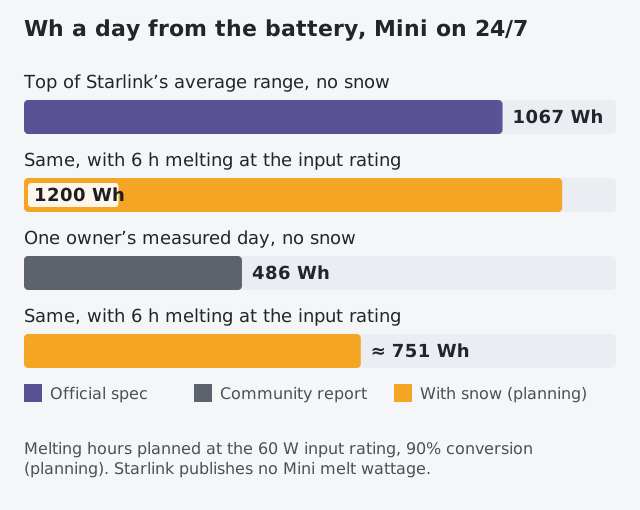
We plan with six snowy hours a day, the same default our calculator uses when you tick snow melt. Change it to match your storm.
| 24/7 day | No snow | Six melting hours | Extra |
|---|---|---|---|
| Top of Starlink’s average (40 W) | 1,067 Wh | 1,200 Wh | 133 Wh |
| One owner’s measured day Community report: A dated measurement posted by an owner, cited | 486 Wh | about 751 Wh | about 267 Wh |
The second row shows why the owner’s figure matters: if your Mini normally sits well below the spec’s top end, melting hours are a bigger share of the extra.
What it does to runtime
During melting hours, at the input rating:
- A 99 Wh USB-C power bank: about 1 h 12 min (versus 1 h 48 min at the top of the average range).
- A 512 Wh power station on 12 V DC: about 6 h 30 min.
- A 12 V 100 Ah LiFePO4 at 0 °F, using Battle Born’s cold capacity (70 Ah Standard: From a regulator, standards body or reference table. Checked Oct 5, 2026): about 12 h 6 min.
That last line is the real winter case: cold cuts the battery while snow raises the load.
What it does to solar
Snowy days are usually dark days, and snow on the panel stops it producing until it’s cleared. Using our panel method (Wh ÷ (peak sun hours × 75%)) Planning assumption: Our stated assumption, used until bench results replace it at the top of Starlink’s average range:
| December, flat panel | No snow | With six melting hours |
|---|---|---|
| Denver (2.3 peak sun hours) | 622 W | 699 W |
| Seattle (0.9 peak sun hours) | 1,674 W | 1,883 W |
Those are averages; a storm day makes far less. The battery carries snowy days, which is why days of autonomy matters most in snow country.
Choosing a Snow Melt mode on battery
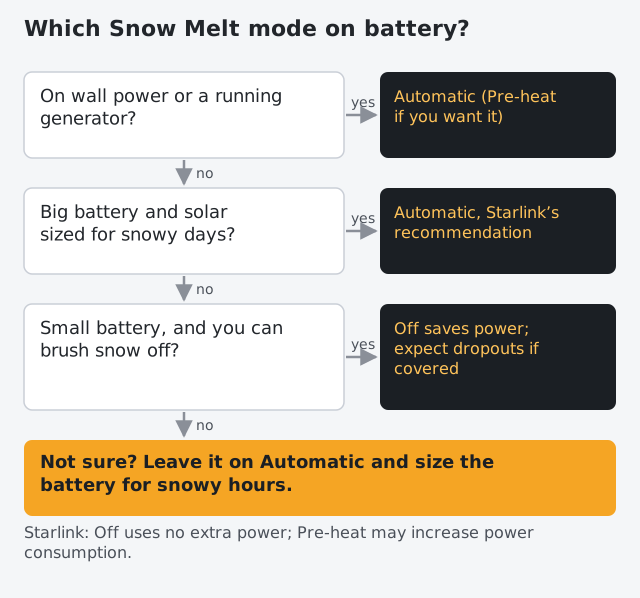
- Automatic is Starlink’s recommendation and the right default: it heats only when it detects snow.
- Pre-heat keeps the dish warm to resist buildup. Starlink says it may increase power consumption. Save it for wall or generator power.
- Off uses no extra power. It makes sense on a small battery if you’re there to brush snow off, and accept that a covered dish may drop out.
Sleep schedules and snow. The Starlink app's Sleep Schedule (Settings > Starlink > Sleep Schedule) can be used to save power; while asleep Starlink gives no internet, does not melt snow, and can't be managed remotely. Official spec: From a Starlink specification sheet or help article. Checked Oct 5, 2026 Sleeping eight hours a night at the top of the average range saves about 356 Wh, but if it snows overnight the Mini wakes up covered. On a storm night, consider leaving it awake or plan to clear it in the morning. Our overnight battery guide covers sleep schedules in detail.
Placement beats melting
Every inch of snow you avoid is power you don’t spend.
- Up and clear. A pole, railing or roof rack keeps it above drifts and out of roof slide zones. Our mounts guide covers the options.
- Not under a roof edge or tree. Falling snow loads land in one go.
- Aim it the way the app says. Starlink Mini uses software-assisted manual orienting (no motors). Starlink doesn’t publish guidance on tilting for snow, so we focus on height and clearance instead.
- Keep the power gear warm and dry. Starlink says the router and power supply are also rated to operate indoors between 0 and +30°C (+32 to +86°F). The Mini power supply is rated IP66 Type 4. Even so, a battery or power station should stay inside, and the USB-C end of Starlink’s cable should never be outdoors. The barrel-jack end of the USB-C cable seals to IP67 at the Mini; the USB-C end should not be exposed outdoors.
Common mistakes
- Covering the dish. It blocks melting and degrades signal, per Starlink.
- Scraping ice. Picks, chisels and scrapers can damage it. Brush gently or let it melt.
- Sizing for the average day. Snowy days are the high-load, low-sun days. Size for them.
- Thin 12 V wiring. Melting pushes the draw toward the full rating; voltage drop that’s fine at average can cause dropouts. See car and 12 V.
- A cold battery. Capacity drops, and below freezing many LiFePO4 batteries refuse to charge. See charging LiFePO4 below freezing.
What we don’t know
- The Mini’s actual melt wattage. Not published; no dated measurement found. If one appears, it goes in our watts table with its provenance badge.
- How often Automatic heats in a given storm. It depends on snowfall and temperature.
- How much more Pre-heat uses. Starlink only says it may increase power consumption.
What to do next
- Set Snow Melt to Automatic unless your battery is small and you can clear snow by hand.
- Run the calculator with snow melt ticked and your snowy hours to see the battery and panel you need.
- Read our winter off-grid guide for cold batteries and short days.
Questions people ask
Can the Starlink Mini melt snow?
Yes. Starlink's spec sheet says the Mini can melt snow at up to 1 in/hr. The Snow Melt setting in the Starlink app controls it: Off, Automatic (recommended) or Pre-heat.
How much power does the Starlink Mini use to melt snow?
Starlink doesn't publish a melt wattage for the Mini, and we haven't found a dated owner measurement. Its input rating, 60 W, is the most it's rated to take, so we use that as the ceiling for snowy hours. Starlink says Pre-heat may increase power consumption.
Should I turn off snow melt on battery power?
Only if you can clear snow yourself or can live without service until it melts. Starlink says Off uses no extra power. On a small battery that saves energy, but heavy snow covering the dish can cause intermittent connectivity or loss of service.
Can I put a cover over my Starlink Mini in winter?
Starlink strongly recommends against protective covers: it says they degrade performance, including the dish's ability to melt snow.
How do I get snow off a Starlink Mini?
Gently, by hand or with a soft brush. Starlink says you can remove snow or ice gently at any time, but not with picks, chisels or scrapers, which can damage it. Light ice or icicles generally don't affect performance.
Will a sleep schedule melt snow?
No. Starlink says the dish gives no internet and melts no snow while asleep. If snow falls overnight with the Mini asleep, expect to clear it in the morning or wait for it to melt once it wakes.
Does the Starlink Mini work in cold weather?
Starlink rates the Mini to operate down to -22 °F. The power supply and batteries are the weaker links in the cold: Starlink rates the router and power supply for indoor use from 32 to 86 °F, and LiFePO4 batteries hold less and can't charge below freezing.
Sources
- Starlink Mini Specifications (PDF) · retrieved
- How Starlink Performs in Snow and Ice (Starlink Help Center) · retrieved
- How do I adjust snow melt mode? (Starlink Help Center) · retrieved
- I live in an area with snow, heavy rain, wind, lightning, or extreme temperatures - can I still use Starlink? (Starlink Help Center) · retrieved
- How do I set up sleep schedule? (Starlink Help Center) · retrieved
- Starlink 12V Conversion (Lorjor Explore) · retrieved
- How to Winterize and Store LiFePO4 Batteries (Battle Born FAQ) · retrieved
Starlink figures render from our watts table and fact file with the date we checked them. Runtime and solar math uses the planning assumptions on how we get our numbers until bench results replace them.
Independent · not affiliated with SpaceX or Starlink. We don’t sell Starlink. Links to Starlink’s plan pages here use the site owner’s own referral link (Starlink may give the owner a referral reward; your price is the same); nothing else in this article earns us anything. We haven’t used a Starlink Mini ourselves: Mini figures come from Starlink’s published specs or dated owner reports, labeled that way. General information, not electrical advice. How we make money · Report an error